

Upgrading to Docusaurus v3
This documentation will help you upgrade your site from Docusaurus v2 to Docusaurus v3.
Docusaurus v3 is a new major version, including breaking changes requiring you to adjust your site accordingly. We will guide to during this process, and also mention a few optional recommendations.
This is not a full rewrite, and the breaking changes are relatively easy to handle. The simplest sites will eventually upgrade by simply updating their npm dependencies.
The main breaking change is the upgrade from MDX v1 to MDX v3. Read the MDX v2 and MDX v3 release notes for details. MDX will now compile your Markdown content more strictly and with subtle differences.
Upgrading Dependencies
Section titled “Upgrading Dependencies”Upgrading to Docusaurus v3 requires upgrading core Docusaurus dependencies (@docusaurus/name), but also other related packages.
Docusaurus v3 now uses the following dependencies:
- Node.js v18.0+
- React v18.0+
- MDX v3.0+
- TypeScript v5.1+
- prism-react-renderer v2.0+
- react-live v4.0+
- remark-emoji v4.0+
- mermaid v10.4+
A typical package.json dependency upgrade example:
 {
   "dependencies": {
     // upgrade to Docusaurus v3
-    "@docusaurus/core": "2.4.3",
-    "@docusaurus/preset-classic": "2.4.3",
+    "@docusaurus/core": "3.0.0",
+    "@docusaurus/preset-classic": "3.0.0",
     // upgrade to MDX v3
-    "@mdx-js/react": "^1.6.22",
+    "@mdx-js/react": "^3.0.0",
     // upgrade to prism-react-renderer v2.0+
-    "prism-react-renderer": "^1.3.5",
+    "prism-react-renderer": "^2.1.0",
     // upgrade to React v18.0+
-    "react": "^17.0.2",
-    "react-dom": "^17.0.2"
+    "react": "^18.2.0",
+    "react-dom": "^18.2.0"
   },
   "devDependencies": {
     // upgrade Docusaurus dev dependencies to v3
-    "@docusaurus/module-type-aliases": "2.4.3",
-    "@docusaurus/types": "2.4.3"
+    "@docusaurus/module-type-aliases": "3.0.0",
+    "@docusaurus/types": "3.0.0"
   }
   "engines": {
     // require Node.js 18.0+
-    "node": ">=16.14"
+    "node": ">=18.0"
   }
 }
For TypeScript users:
 {
   "devDependencies": {
     // swap the external TypeScript config package for the new official one
-    "@tsconfig/docusaurus": "^1.0.7",
+    "@docusaurus/tsconfig": "3.0.0",
     // upgrade React types to v18.0+
-    "@types/react": "^17.0.69",
+    "@types/react": "^18.2.29",
     // upgrade TypeScript to v5.1+
-    "typescript": "~4.7.4"
+    "typescript": "~5.2.2"
   }
 }
Upgrading MDX
Section titled “Upgrading MDX”MDX is a major dependency of Docusaurus responsible for compiling your .md and .mdx files to React components.
The transition from MDX v1 to MDX v3 is the main challenge to the adoption of Docusaurus v3. Most breaking changes come from MDX v2, and MDX v3 is a relatively small release.
Some documents that compiled successfully under Docusaurus v2 might now fail to compile under Docusaurus v3.
Other documents might also render differently.
Upgrading MDX comes with all the breaking changes documented on the MDX v2 and MDX v3 release blog posts. Most breaking changes come from MDX v2, and MDX v3 is a relatively small release. The MDX v2 migration guide has a section on how to update MDX files that will be particularly relevant to us. Also make sure to read the Troubleshooting MDX page that can help you interpret common MDX error messages.
Make sure to also read our updated MDX and React documentation page.
Using the MDX playground
Section titled “Using the MDX playground”The MDX playground is your new best friend. It permits to understand how your content is compiled to React components, and troubleshoot compilation or rendering issues in isolation.
Configuring the MDX playground options for Docusaurus
To obtain a compilation behavior similar to what Docusaurus v2 uses, please turn on these options on the MDX playground:
- Use
MDX - Use
remark-gfm - Use
remark-directive
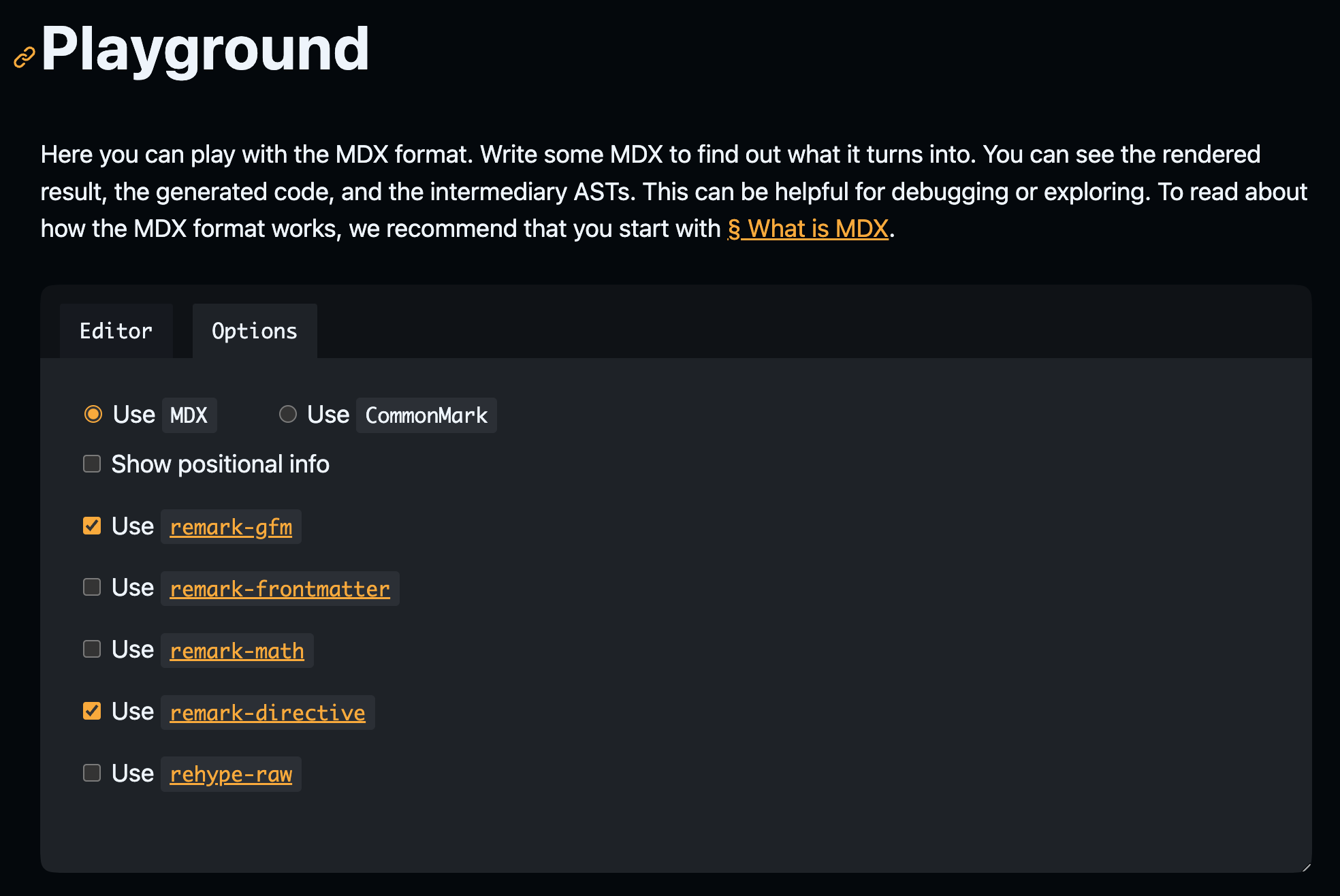
Using the two MDX playgrounds side-by-side, you will soon notice that some content is compiled differently or fails to compile in v2.
Using the MDX checker CLI
Section titled “Using the MDX checker CLI”We provide a docusaurus-mdx-checker CLI that permits to easily spot problematic content. Run this command on your site to obtain a list of files that will fail to compile under MDX v3.
npx docusaurus-mdx-checkerFor each compilation issue, the CLI will log the file path and a line number to look at.
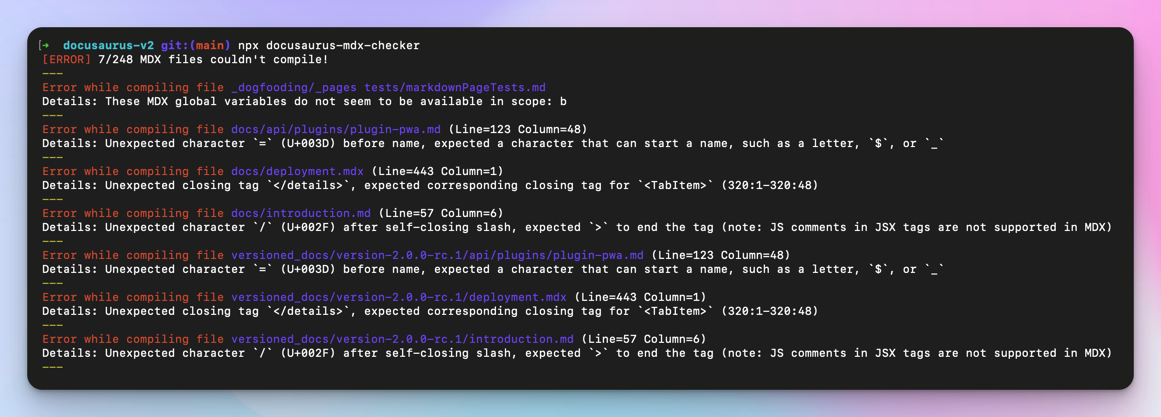
Common MDX problems
Section titled “Common MDX problems”Docusaurus cannot document exhaustively all the changes coming with MDX. That's the responsibility of the MDX v2 and MDX v3 migration guides.
However, by upgrading a few Docusaurus sites, we noticed that most of the issues come down to only a few cases that we have documented for you.
Bad usage of {
Section titled “Bad usage of {”The { character is used for opening JavaScript expressions. MDX will now fail if what you put inside {expression} is not a valid expression.
The object shape looks like {username: string, age: number}Bad usage of <
Section titled “Bad usage of <”The < character is used for opening JSX tags. MDX will now fail if it thinks your JSX is invalid.
Use Android version <5

You can use a generic type like Array<T>

Follow the template "Road to <YOUR_MINOR_VERSION>"Bad usage of GFM Autolink
Section titled “Bad usage of GFM Autolink”Docusaurus supports GitHub Flavored Markdown (GFM), but autolink using the <link> syntax is not supported anymore by MDX.
<sebastien@thisweekinreact.com>

<http://localhost:3000>Lower-case MDXComponent mapping
Section titled “Lower-case MDXComponent mapping”For users providing a custom MDXComponent mapping, components are now "sandboxed":
- a
MDXComponentmapping forh1only gets used for# hibut not for<h1>hi</h1> - a lower-cased custom element name will not be substituted by its respective
MDXComponentcomponent anymore
Unintended extra paragraphs
Section titled “Unintended extra paragraphs”In MDX v3, it is now possible to interleave JSX and Markdown more easily without requiring extra line breaks. Writing content on multiple lines can also produce new expected <p> tags.
Unintended usage of directives
Section titled “Unintended usage of directives”Docusaurus v3 now uses Markdown Directives (implemented with remark-directive) as a generic way to provide support for admonitions, and other upcoming Docusaurus features.
This is a :textDirective

::leafDirective

:::containerDirective

Container directive content

:::Unsupported indented code blocks
Section titled “Unsupported indented code blocks”MDX does not transform indented text as code blocks anymore.
console.log("hello");Other Markdown incompatibilities
Section titled “Other Markdown incompatibilities”Emphasis starting or ending with a space or a punctuation
Section titled “Emphasis starting or ending with a space or a punctuation”New MDX parser now strictly complies with the CommonMark spec. CommonMark spec has introduced rules for emphasis around spaces and punctuation, which are incompatible especially with languages that do not use a space to split words, since v0.14.
Japanese and Chinese are most affected by this, but there are some other languages that can be affected (e.g. Thai and Khmer), for example when you try to emphasize an inline code or a link. Languages that use a space to split words are much less affected.
** (other than `**`) in the following example were parsed as intended in Docusaurus 2, but are not now in Docusaurus 3.
**Do not end a range of emphasis with a space. **Or `**` will not work as intended.

<!-- Japanese -->
**「。」の後に文を続けると`**`が意図した動作をしません。**また、**[リンク](https://docusaurus.io/)**や**`コード`**のすぐ外側に`**`、そのさらに外側に句読点以外がある場合も同様です。
See the detailed conditions and how to upgrade
If * or ** matches either of the following conditions, it will not work as the beginning of an emphasis mark anymore:
- The next character is a space (e.g.
word* word) - The previous character is a punctuation character and the next character is a letter (not a space or punctuation character) (e.g.
文**(文))
On the contrary, if * or ** matches either of the following conditions, it will not work as the end of an emphasis mark anymore:
- The previous character is a space (e.g.
word *word) - The next character is a punctuation character and the previous character is a letter (e.g.
文。**文)
“A punctuation character” includes non-ASCII ones, brackets, quotation marks and some symbols including % and @. More strictly speaking, a character whose 2-letters Unicode category starts with P is treated as a punctuation character here.
MDX plugins
Section titled “MDX plugins”All the official packages (Unified, Remark, Rehype...) in the MDX ecosystem are now ES Modules only and do not support CommonJS anymore.
In practice this means that you can't do require("remark-plugin") anymore.
Formatters
Section titled “Formatters”Prettier, the most common formatter, supports only the legacy MDX v1, not v3 yet as of Docusaurus v3.0.0. You can add {/* prettier-ignore */} before the incompatible parts of your code to make it work with Prettier.
{/* prettier-ignore */}
<SomeComponent>Some long text in the component</SomeComponent>
If you get tired of too many {/* prettier-ignore */} insertions, you can consider disabling MDX formatting by Prettier by adding the following to your .prettierignore file, until it starts supporting MDX v3:
*.mdxOther Breaking Changes
Section titled “Other Breaking Changes”Apart the MDX v3 upgrade, here is an exhaustive list of breaking changes coming with Docusaurus v3.
Node.js v18.0
Section titled “Node.js v18.0”Node.js 16 reached End-of-Life, and Docusaurus v3 now requires Node.js >= 18.0.
React v18.0+
Section titled “React v18.0+”Docusaurus v3 now requires React >= 18.0.
React 18 comes with its own breaking changes that should be relatively easy to handle, depending on the amount of custom React code you created for your site. The official themes and plugins are compatible with React 18.
Prism-React-Renderer v2.0+
Section titled “Prism-React-Renderer v2.0+”Docusaurus v3 upgrades prism-react-renderer to v2.0+. This library is used for code block syntax highlighting.
React-Live v4.0+
Section titled “React-Live v4.0+”For users of the @docusaurus/theme-live-codeblock package, Docusaurus v3 upgrades react-live to v4.0+.
remark-emoji v4.0+
Section titled “remark-emoji v4.0+”Docusaurus v3 upgrades remark-emoji to v4.0+. This library is to support :emoji: shortcuts in Markdown.
Mermaid v10.4+
Section titled “Mermaid v10.4+”For users of the @docusaurus/theme-mermaid package, Docusaurus v3 upgrades mermaid to v10.4+.
TypeScript v5.1+
Section titled “TypeScript v5.1+”Docusaurus v3 now requires TypeScript >= 5.1.
TypeScript base config
Section titled “TypeScript base config”The official Docusaurus TypeScript config has been re-internalized from the external package @tsconfig/docusaurus to our new monorepo package @docusaurus/tsconfig.
This new package is versioned alongside all the other Docusaurus core packages, and will be used to ensure TypeScript retro-compatibility and breaking changes on major version upgrades.
New Config Loader
Section titled “New Config Loader”Docusaurus v3 changes its internal config loading library from import-fresh to jiti. It is responsible for loading files such as docusaurus.config.js or sidebars.js, and Docusaurus plugins.
Admonition Warning
Section titled “Admonition Warning”For historical reasons, we support an undocumented admonition :::warning that renders with a red color.
However, the color and icon have always been wrong. Docusaurus v3 re-introduces :::warning admonition officially, documents it, and fixes the color and icon.
Versioned Sidebars
Section titled “Versioned Sidebars”This breaking change will only affect Docusaurus v2 early adopters who versioned their docs before v2.0.0-beta.10 (December 2021).
When creating version v1.0.0, the sidebar file contained a prefix version-v1.0.0/ that Docusaurus v3 does not support anymore.
{
  "version-v1.0.0/docs": [
    "version-v1.0.0/introduction",
    "version-v1.0.0/prerequisites"
  ]
}Blog Feed Limit
Section titled “Blog Feed Limit”The @docusaurus/plugin-content-blog now limits the RSS feed to the last 20 entries by default. For large Docusaurus blogs, this is a more sensible default value to avoid an increasingly large RSS file.
Docs Theme Refactoring
Section titled “Docs Theme Refactoring”For users that swizzled docs-related theme components (like @theme/DocPage), these components have been significantly refactored to make it easier to customize.
Technically, this is not a breaking change because these components are flagged as unsafe to swizzle, however many Docusaurus sites ejected docs-related components, and will be interested to know their customizations might break Docusaurus.
Optional Changes
Section titled “Optional Changes”Some changes are not mandatory, but remain useful to be aware of to plainly leverage Docusaurus v3.
Automatic JSX runtime
Section titled “Automatic JSX runtime”Docusaurus v3 now uses the React 18 "automatic" JSX runtime.
It is not needed anymore to import React in JSX files that do not use any React API.
- import React from 'react';

  export default function MyComponent() {
    return <div>Hello</div>;
  }
ESM and TypeScript Configs
Section titled “ESM and TypeScript Configs”Docusaurus v3 supports ESM and TypeScript config files, and it might be a good idea to adopt those new options.
export default {
  title: 'Docusaurus',
  url: 'https://docusaurus.io',
  // your site config ...
};import type {Config} from '@docusaurus/types';
import type * as Preset from '@docusaurus/preset-classic';
const config: Config = {
title: 'My Site',
favicon: 'img/favicon.ico',
presets: [
[
'classic',
{
/* Your preset config here */
} satisfies Preset.Options,
],
],
themeConfig: {
/* Your theme config here */
} satisfies Preset.ThemeConfig,
};
export default config;Using the .mdx extension
Section titled “Using the .mdx extension”We recommend using the .mdx extension whenever you use JSX, import, or export (i.e. MDX features) inside a Markdown file. It is semantically more correct and improves compatibility with external tools (IDEs, formatters, linters, etc.).
In future versions of Docusaurus, .md files will be parsed as standard CommonMark, which does not support these features. In Docusaurus v3, .md files keep being compiled as MDX files, but it will be possible to opt-in for CommonMark.
Upgrading math packages
Section titled “Upgrading math packages”If you use Docusaurus to render Math Equations, you should upgrade the MDX plugins.
Make sure to use remark-math 6 and rehype-katex 7 for Docusaurus v3 (using MDX v3). We can't guarantee other versions will work.
{
-  "remark-math": "^3.0.0",
+  "remark-math": "^6.0.0",
-  "rehype-katex": "^5.0.0"
+  "rehype-katex": "^7.0.0"
}
hast-util-is-element is now unnecessary in Docusaurus v3. If you have installed it and don't use it somewhere else, you can just remove it by running npm uninstall hast-util-is-element.
Turn off MDX v1 compat
Section titled “Turn off MDX v1 compat”Docusaurus v3 comes with MDX v1 compatibility options, that are turned on by default.
export default {
  markdown: {
    mdx1Compat: {
      comments: true,
      admonitions: true,
      headingIds: true,
    },
  },
};
comments option
Section titled “comments option”This option allows the usage of HTML comments inside MDX, while HTML comments are officially not supported anymore.
For MDX files, we recommend to progressively use MDX {/* comments */} instead of HTML <!-- comments -->, and then turn this compatibility option off.
admonitions option
Section titled “admonitions option”This option allows the usage of the Docusaurus v2 admonition title syntax:
:::note Your Title

content

:::
Docusaurus now implements admonitions with Markdown Directives (implemented with remark-directive), and the syntax to provide a directive label requires square brackets:
:::note[Your Title]

content

:::
We recommend to progressively use the new Markdown directive label syntax, and then turn this compatibility option off.
headingIds option
Section titled “headingIds option”This option allows the usage of the Docusaurus v2 explicit heading id syntax:
<Code language="md">{'### Hello World \u007B#my-explicit-id}\n'}</Code>This syntax is now invalid MDX, and would require to escape the { character: \{#my-explicit-id}.
We recommend to keep this compatibility option on for now, until we provide a new syntax compatible with newer versions of MDX.
Troubleshooting
Section titled “Troubleshooting”In case of any upgrade problem, the first things to try are:
- make sure all your docs compile in the MDX playground, or using
npx docusaurus-mdx-checker - delete
node_modulesandpackage-lock.json, and then runnpm installagain - run
docusaurus clearto clear the caches - remove third-party plugins that might not support Docusaurus v3
- delete all your swizzled components
Once you have tried that, you can ask for support through the following support channels:
- Docusaurus v3 - Upgrade Support
- Docusaurus v3 - Discord channel #migration-v2-to-v3
- MDX v3 - Upgrade Support
- MDX v3 - Remark/Rehype Plugins Support
- MDX v3 - Discord channel #migration-mdx-v3
Please consider our time is precious. To ensure that your support request is not ignored, we kindly ask you to:
- provide a minimal reproduction that we can easily run, ideally created with docusaurus.new
- provide a live deployment url showing the problem in action (if your site can build)
- explain clearly the problem, much more than an ambiguous "it doesn't work"
- include as much relevant material as possible: code snippets, repo url, git branch urls, full stack traces, screenshots and videos
- present your request clearly, concisely, showing us that you have made an effort to help us help you
Alternatively, you can look for a paid Docusaurus Service Provider to execute this upgrade for you. If your site is open source, you can also ask our community for free, benevolent help.