docusaurus.config.js
Overview
Section titled “Overview”docusaurus.config.js contains configurations for your site and is placed in the root directory of your site.
This file is run in Node.js and should export a site configuration object, or a function that creates it.
The docusaurus.config.js file supports:
Examples:
export default {
  title: 'Docusaurus',
  url: 'https://docusaurus.io',
  // your site config ...
};export default async function createConfigAsync() {
return {
title: 'Docusaurus',
url: 'https://docusaurus.io',
// your site config ...
};
}Required fields
Section titled “Required fields”- Type:
string
Title for your website. Will be used in metadata and as browser tab title.
export default {
  title: 'Docusaurus',
};- Type:
string
URL for your website. This can also be considered the top-level hostname. For example, https://facebook.github.io is the URL of https://facebook.github.io/metro/, and https://docusaurus.io is the URL for https://docusaurus.io. This field is related to the baseUrl field.
export default {
  url: 'https://docusaurus.io',
};baseUrl
Section titled “baseUrl”- Type:
string
The base URL of your site is the path segment appearing just after the url, letting you eventually host your site under a subpath instead of at the root of the domain.
For example, let's consider you want to host a site at https://facebook.github.io/metro/, then you must configure it accordingly:
urlshould be'https://facebook.github.io'baseUrlshould be'/metro/'
By default, a Docusaurus site is hosted at the root of the domain:
export default {
  baseUrl: '/',
};Optional fields
Section titled “Optional fields”favicon
Section titled “favicon”- Type:
string | undefined
Path to your site favicon; must be a URL that can be used in link's href. For example, if your favicon is in static/img/favicon.ico:
export default {
  favicon: '/img/favicon.ico',
};
trailingSlash
Section titled “trailingSlash”- Type:
boolean | undefined
Allow to customize the presence/absence of a trailing slash at the end of URLs/links, and how static HTML files are generated:
undefined(default): keeps URLs untouched, and emit/docs/myDoc/index.htmlfor/docs/myDoc.mdtrue: add trailing slashes to URLs/links, and emit/docs/myDoc/index.htmlfor/docs/myDoc.mdfalse: remove trailing slashes from URLs/links, and emit/docs/myDoc.htmlfor/docs/myDoc.md
- Type:
Object
The i18n configuration object to localize your site.
Example:
export default {
  i18n: {
    defaultLocale: 'en',
    locales: ['en', 'fa'],
    path: 'i18n',
    localeConfigs: {
      en: {
        label: 'English',
        direction: 'ltr',
        htmlLang: 'en-US',
        calendar: 'gregory',
        path: 'en',
        translate: false,
        url: 'https://en.example.com',
        baseUrl: '/',
      },
      fa: {
        label: 'فارسی',
        direction: 'rtl',
        htmlLang: 'fa-IR',
        calendar: 'persian',
        path: 'fa',
        translate: true,
        url: 'https://fa.example.com',
        baseUrl: '/',
      },
    },
  },
};defaultLocale: The locale that (1) does not have its name in the base URL (2) gets started withdocusaurus startwithout--localeoption (3) will be used for the<link hrefLang="x-default">taglocales: List of locales deployed on your site. Must containdefaultLocale.path: Root folder which all locale folders are relative to. Can be absolute or relative to the config file. Defaults toi18n.localeConfigs: Individual options for each locale.label: The label displayed for this locale in the locales dropdown.direction:ltr(default) orrtl(for right-to-left languages like Farsi, Arabic, Hebrew, etc.). Used to select the locale's CSS and HTML meta attribute.htmlLang: BCP 47 language tag to use in<html lang="...">(or any other DOM tag name) and in<link ... hreflang="...">calendar: the calendar used to calculate the date era. Note that it doesn't control the actual string displayed:MM/DD/YYYYandDD/MM/YYYYare bothgregory. To choose the format (DD/MM/YYYYorMM/DD/YYYY), set your locale name toen-GBoren-US(enmeansen-US).path: Root folder that all plugin localization folders of this locale are relative to. Will be resolved againsti18n.path. Defaults to the locale's name (i18n/<locale>). Note: this has no effect on the locale'sbaseUrl—customization of base URL is a work-in-progress.translate: Should we run the translation process for this locale? By default, it is enabled if thei18n/<locale>folder existsurl: This lets you override thesiteConfig.url, particularly useful if your site is deployed over multiple domains.baseUrl: This lets you override the default localizedbaseUrlDocusaurus infers from yoursiteConfig.baseUrl, giving you more control to host your localized site in less common ways, in particularly deployments over multi-domains
storage
Section titled “storage”- Type:
Object
Site-wide browser storage options that theme authors should strive to respect.
export default {
  storage: {
    type: 'localStorage',
    namespace: true,
  },
};type: The browser storage theme authors should use. Possible values arelocalStorageandsessionStorage. Defaults tolocalStorage.namespace: Whether to namespace the browser storage keys to avoid storage key conflicts when Docusaurus sites are hosted under the same domain, or on localhost. Possible values arestring | boolean. The namespace is appended at the end of the storage keyskey-namespace. Usetrueto automatically generate a random namespace from your siteurl + baseUrl. Defaults tofalse(no namespace, historical behavior). Use thefuture.v4.siteStorageNamespacingflag to default this totrue.
future
Section titled “future”- Type:
Object
The future configuration object permits to opt-in for upcoming/unstable/experimental Docusaurus features that are not ready for prime time.
It is also a way to opt-in for upcoming breaking changes coming in the next major versions, enabling you to prepare your site for the next version while staying on the previous one. The Remix Future Flags blog post greatly explains this idea.
Example:
export default {
  future: {
    v4: {
      useCssCascadeLayers: true,
      siteStorageNamespacing: true,
      fasterByDefault: true,
      mdx1CompatDisabledByDefault: true,
    },
    faster: {
      swcJsLoader: true,
      swcJsMinimizer: true,
      swcHtmlMinimizer: true,
      lightningCssMinimizer: true,
      rspackBundler: true,
      rspackPersistentCache: true,
      ssgWorkerThreads: true,
      mdxCrossCompilerCache: true,
    },
    experimental_router: 'hash',
  },
};v4: Permits to opt-in for upcoming Docusaurus v4 breaking changes and features, to prepare your site in advance for this new version. Usetrueas a shorthand to enable all the flags.useCssCascadeLayers: This enables the Docusaurus CSS Cascade Layers plugin with pre-configured layers that we plan to apply by default for Docusaurus v4.siteStorageNamespacing: Defaults thestorage.namespaceconfig totrueinstead offalse. This enables automatic browser storage key namespacing, which avoids storage key conflicts when multiple Docusaurus sites are hosted under the same domain, or on localhost.fasterByDefault: Defaults allfuture.fasterflags totrueinstead offalse. This enables Docusaurus Faster features by default. Requires having@docusaurus/fasterin your dependencies. If you explicitly set individualfasterflags, those explicit values take precedence.mdx1CompatDisabledByDefault: Defaults allmarkdown.mdx1Compatflags tofalseinstead oftrue. This prepares your site for Docusaurus v4, which will not enable MDX v1 compatibility by default. If you explicitly set individualmdx1Compatflags, those explicit values take precedence.
faster: An object containing feature flags to make the Docusaurus build faster. This requires adding the@docusaurus/fasterpackage to your site's dependencies. Usetrueas a shorthand to enable all flags. Read more on the Docusaurus Faster issue. Available feature flags:swcJsLoader: Use SWC to transpile JS (instead of Babel).swcJsMinimizer: Use SWC to minify JS (instead of Terser).swcHtmlMinimizer: Use SWC to minify HTML and inlined JS/CSS (instead of html-minifier-terser).lightningCssMinimizer: Use Lightning CSS to minify CSS (instead of cssnano and clean-css).rspackBundler: Use Rspack to bundle your app (instead of webpack).rspackPersistentCache: Use Rspack Persistent Cache to re-build your app faster on subsequent builds. RequiresrspackBundler: true. Requires persisting./node_modules/.cacheacross rebuilds.mdxCrossCompilerCache: Compile MDX files only once for both browser/Node.js environments instead of twice.ssgWorkerThreads: Using a Node.js worker thread pool to execute the static site generation phase faster.gitEagerVcs: Upgrades the default VCS strategy todefault-v2, that reads your whole Git repository at once instead of per-file, making Git operations faster on large repositories.
experimental_router: The router type to use. Possible values arebrowserandhash. Defaults tobrowser. Thehashrouter is only useful for rare cases where you want to opt-out of static site generation, have a fully client-side app with a singleindex.htmlentrypoint file. This can be useful to distribute a Docusaurus site as a.ziparchive that you can browse locally without running a web server.experimental_vcs: The Version Control System (VCS) implementation to use to read file info (creation/last update date/author). Read the dedicated section below for details.
experimental_vcs
Section titled “experimental_vcs”This exposes an API that lets you provide your own Version Control System (VCS) implementation to read file info (creation/last update date/author).
export default {
  future: {
    experimental_vcs: {
      initialize: ({siteDir}) => {
        // Initialize your VCS client here.
        // If you want to read your VCS eagerly/incrementally on startup,
        // this is the place to do it.
        // This function is synchronous on purpose and not awaited
        // It should not delay Docusaurus startup, but be run in parallel.
      },
      getFileCreationInfo: async (filePath: string) => {
        // Provide your own implementation to read file creation info.
        return getFileCreationInfo(filePath);
      },
      getFileLastUpdateInfo: async (filePath: string) => {
        // Provide your own implementation to read file creation info.
        return getFileLastUpdateInfo(filePath);
      },
    },
  },
};
VCS Presets
Section titled “VCS Presets”It is possible to pass a boolean VCS value:
true: enables the default VCS preset (default-v1ordefault-v2, depending on the Docusaurus FastergitEagerVcsflag value)false: disables the VCS, always returnsnullfor all files
export default {
  future: {
    experimental_vcs: true, // Enables the default VCS preset
  },
};
It is also possible to choose VCS preset we provide out of the box by its name.
export default {
  future: {
    experimental_vcs: 'presetName',
  },
};
The available preset names are:
git-ad-hoc: the historicalgit log <filename>based strategy.git-eager: the new Git strategy that reads your whole repository upfront.hardcoded: returns hardcoded value, useful in dev/tests to speed up developer experience.disabled: returnsnullfor all files, considering them untracked.default-v1: the historical default (git-ad-hocin prod,hardcodedin dev)default-v2: the upcoming default (git-eagerin prod,hardcodedin dev)
Unless you have specific needs, we recommend using the default presets (default-v1 or default-v2), that skip reading file info in development mode for better performance.
VCS Types
Section titled “VCS Types”type VcsChangeInfo = {timestamp: number; author: string};
type VscInitializeParams = {
siteDir: string;
};
type VcsConfig = {
initialize: (params: VscInitializeParams) => void;
getFileCreationInfo: (filePath: string) => Promise<VcsChangeInfo | null>;
getFileLastUpdateInfo: (filePath: string) => Promise<VcsChangeInfo | null>;
};
type VcsPreset =
| 'git-ad-hoc'
| 'git-eager'
| 'hardcoded'
| 'disabled'
| 'default-v1'
| 'default-v2';noIndex
Section titled “noIndex”- Type:
boolean
This option adds <meta name="robots" content="noindex, nofollow"> to every page to tell search engines to avoid indexing your site (more information here).
Example:
export default {
  noIndex: true, // Defaults to `false`
};
onBrokenLinks
Section titled “onBrokenLinks”- Type:
'ignore' | 'log' | 'warn' | 'throw'
The behavior of Docusaurus when it detects any broken link.
By default, it throws an error, to ensure you never ship any broken link.
onBrokenAnchors
Section titled “onBrokenAnchors”- Type:
'ignore' | 'log' | 'warn' | 'throw'
The behavior of Docusaurus when it detects any broken anchor declared with the Heading component of Docusaurus.
By default, it prints a warning, to let you know about your broken anchors.
onBrokenMarkdownLinks
Section titled “onBrokenMarkdownLinks”- Type:
'ignore' | 'log' | 'warn' | 'throw'
The behavior of Docusaurus when it detects any broken Markdown link.
By default, it prints a warning, to let you know about your broken Markdown link.
onDuplicateRoutes
Section titled “onDuplicateRoutes”- Type:
'ignore' | 'log' | 'warn' | 'throw'
The behavior of Docusaurus when it detects any duplicate routes.
By default, it displays a warning after you run yarn start or yarn build.
tagline
Section titled “tagline”- Type:
string
The tagline for your website.
export default {
  tagline:
    'Docusaurus makes it easy to maintain Open Source documentation websites.',
};
organizationName
Section titled “organizationName”- Type:
string
The GitHub user or organization that owns the repository. You don't need this if you are not using the docusaurus deploy command.
export default {
  // Docusaurus' organization is facebook
  organizationName: 'facebook',
};
projectName
Section titled “projectName”- Type:
string
The name of the GitHub repository. You don't need this if you are not using the docusaurus deploy command.
export default {
  projectName: 'docusaurus',
};
deploymentBranch
Section titled “deploymentBranch”- Type:
string
The name of the branch to deploy the static files to. You don't need this if you are not using the docusaurus deploy command.
export default {
  deploymentBranch: 'gh-pages',
};
githubHost
Section titled “githubHost”- Type:
string
The hostname of your server. Useful if you are using GitHub Enterprise. You don't need this if you are not using the docusaurus deploy command.
export default {
  githubHost: 'github.com',
};
githubPort
Section titled “githubPort”- Type:
string
The port of your server. Useful if you are using GitHub Enterprise. You don't need this if you are not using the docusaurus deploy command.
export default {
  githubPort: '22',
};
themeConfig
Section titled “themeConfig”- Type:
Object
The theme configuration object to customize your site UI like navbar and footer.
Example:
export default {
  themeConfig: {
    docs: {
      sidebar: {
        hideable: false,
        autoCollapseCategories: false,
      },
    },
    colorMode: {
      defaultMode: 'light',
      disableSwitch: false,
      respectPrefersColorScheme: true,
    },
    navbar: {
      title: 'Site Title',
      logo: {
        alt: 'Site Logo',
        src: 'img/logo.svg',
        width: 32,
        height: 32,
      },
      items: [
        {
          to: 'docs/docusaurus.config.js',
          activeBasePath: 'docs',
          label: 'docusaurus.config.js',
          position: 'left',
        },
        // ... other links
      ],
    },
    footer: {
      style: 'dark',
      links: [
        {
          title: 'Docs',
          items: [
            {
              label: 'Docs',
              to: 'docs/doc1',
            },
          ],
        },
        // ... other links
      ],
      logo: {
        alt: 'Meta Open Source Logo',
        src: 'img/meta_oss_logo.png',
        href: 'https://opensource.fb.com',
        width: 160,
        height: 51,
      },
      copyright: `Copyright © ${new Date().getFullYear()} Facebook, Inc.`, // You can also put own HTML here
    },
  },
};
plugins
Section titled “plugins”- Type:
PluginConfig[]
type PluginConfig = string | [string, any] | PluginModule | [PluginModule, any];See plugin method references for the shape of a PluginModule.
export default {
  plugins: [
    'docusaurus-plugin-awesome',
    ['docusuarus-plugin-confetti', {fancy: false}],
    () => ({
      postBuild() {
        console.log('Build finished');
      },
    }),
  ],
};
themes
Section titled “themes”- Type:
PluginConfig[]
export default {
  themes: ['@docusaurus/theme-classic'],
};
presets
Section titled “presets”- Type:
PresetConfig[]
type PresetConfig = string | [string, any];export default {
presets: [],
};markdown
Section titled “markdown”The global Docusaurus Markdown config.
- Type:
MarkdownConfig
type MarkdownPreprocessor = (args: {
  filePath: string;
  fileContent: string;
}) => string;

type MDX1CompatOptions =
  | boolean
  | {
      comments: boolean;
      admonitions: boolean;
      headingIds: boolean;
    };

type ParseFrontMatter = (params: {
  filePath: string;
  fileContent: string;
  defaultParseFrontMatter: ParseFrontMatter;
}) => Promise<{
  frontMatter: {[key: string]: unknown};
  content: string;
}>;

type MarkdownAnchorsConfig = {
  maintainCase: boolean;
};

type OnBrokenMarkdownLinksFunction = (params: {
  sourceFilePath: string; // MD/MDX source file relative to cwd
  url: string; // Link url
  node: Link | Definition; // mdast node
}) => void | string;

type OnBrokenMarkdownImagesFunction = (params: {
  sourceFilePath: string; // MD/MDX source file relative to cwd
  url: string; // Image url
  node: Image; // mdast node
}) => void | string;

type OnUnusedMarkdownDirectivesFunction = (params: {
  sourceFilePath: string; // MD/MDX source file relative to cwd
  directives: Directives[]; // mdast nodes
}) => void | string;

type ReportingSeverity = 'ignore' | 'log' | 'warn' | 'throw';

type MarkdownHooks = {
  onBrokenMarkdownLinks: ReportingSeverity | OnBrokenMarkdownLinksFunction;
  onBrokenMarkdownImages: ReportingSeverity | OnBrokenMarkdownImagesFunction;
  onUnusedMarkdownDirectives:
    | ReportingSeverity
    | OnUnusedMarkdownDirectivesFunction;
};

type MarkdownConfig = {
  format: 'mdx' | 'md' | 'detect';
  mermaid: boolean;
  emoji: boolean;
  preprocessor?: MarkdownPreprocessor;
  parseFrontMatter?: ParseFrontMatter;
  mdx1Compat: MDX1CompatOptions;
  remarkRehypeOptions: object; // see https://github.com/remarkjs/remark-rehype#options
  anchors: MarkdownAnchorsConfig;
  hooks: MarkdownHooks;
};
Example:
export default {
  markdown: {
    format: 'mdx',
    mermaid: true,
    emoji: true,
    preprocessor: ({filePath, fileContent}) => {
      return fileContent.replaceAll('{{MY_VAR}}', 'MY_VALUE');
    },
    parseFrontMatter: async (params) => {
      const result = await params.defaultParseFrontMatter(params);
      result.frontMatter.description =
        result.frontMatter.description?.replaceAll('{{MY_VAR}}', 'MY_VALUE');
      return result;
    },
    mdx1Compat: {
      comments: true,
      admonitions: true,
      headingIds: true,
    },
    anchors: {
      maintainCase: true,
    },
    hooks: {
      onBrokenMarkdownLinks: 'warn',
      onBrokenMarkdownImages: 'throw',
      onUnusedMarkdownDirectives: 'warn',
    },
  },
};<APITable>| Name | Type | Default | Description |
|---|---|---|---|
format |
'mdx' | 'md' | 'detect' |
'mdx' |
The default parser format to use for Markdown content. Using 'detect' will select the appropriate format automatically based on file extensions: .md vs .mdx. |
mermaid |
boolean |
false |
When true, allows Docusaurus to render Markdown code blocks with mermaid language as Mermaid diagrams. |
emoji |
boolean |
true |
When true, allows Docusaurus to render emoji shortcodes (e.g., :+1:) as Unicode emoji (👍). When false, emoji shortcodes are left as-is. |
preprocessor |
MarkdownPreprocessor |
undefined |
Gives you the ability to alter the Markdown content string before parsing. Use it as a last-resort escape hatch or workaround: it is almost always better to implement a Remark/Rehype plugin. |
parseFrontMatter |
ParseFrontMatter |
undefined |
Gives you the ability to provide your own front matter parser, or to enhance the default parser. Read our front matter guide for details. |
mdx1Compat |
MDX1CompatOptions |
{comments: true, admonitions: true, headingIds: true} |
Compatibility options to make it easier to upgrade to Docusaurus v3+. Defaults to all false when future.v4.mdx1CompatDisabledByDefault is enabled. |
anchors |
MarkdownAnchorsConfig |
{maintainCase: false} |
Options to control the behavior of anchors generated from Markdown headings |
remarkRehypeOptions |
object |
undefined |
Makes it possible to pass custom remark-rehype options. |
hooks |
MarkdownHooks |
object |
Make it possible to customize the MDX loader behavior with callbacks or built-in options. |
hooks.onBrokenMarkdownLinks |
ReportingSeverity | OnBrokenMarkdownLinksFunction |
'warn' |
Hook to customize the behavior when encountering a broken Markdown link URL. With the callback function, you can return a new link URL, or alter the link mdast node. |
hooks.onBrokenMarkdownImages |
ReportingSeverity | OnBrokenMarkdownImagesFunction |
'throw' |
Hook to customize the behavior when encountering a broken Markdown image URL. With the callback function, you can return a new image URL, or alter the image mdast node. |
hooks.onUnusedMarkdownDirectives |
ReportingSeverity | OnUnusedMarkdownDirectivesFunction |
'warn' |
Hook to customize the behavior when encountering an unused Markdown directive. Also accepts a callback function, giving you access to the raw Directive AST nodes. |
</APITable>customFields
Section titled “customFields”Docusaurus guards docusaurus.config.js from unknown fields. To add a custom field, define it on customFields.
- Type:
Object
export default {
  customFields: {
    admin: 'endi',
    superman: 'lol',
  },
};
Attempting to add unknown fields in the config will lead to errors during build time:
Error: The field(s) 'foo', 'bar' are not recognized in docusaurus.config.jsstaticDirectories
Section titled “staticDirectories”An array of paths, relative to the site's directory or absolute. Files under these paths will be copied to the build output as-is.
- Type:
string[]
Example:
export default {
  staticDirectories: ['static'],
};
headTags
Section titled “headTags”An array of tags that will be inserted in the HTML <head>. The values must be objects that contain two properties; tagName and attributes. tagName must be a string that determines the tag being created; eg "link". attributes must be an attribute-value map. When custom html elements are needed, set customElement: true.
- Type:
{ tagName: string; attributes: Object; customElement?: boolean; }[]
Example:
export default {
  headTags: [
    {
      tagName: 'link',
      attributes: {
        rel: 'icon',
        href: '/img/docusaurus.png',
      },
    },
  ],
};
This would become <link rel="icon" href="img/docusaurus.png" /> in the generated HTML.
scripts
Section titled “scripts”An array of scripts to load. The values can be either strings or plain objects of attribute-value maps. The <script> tags will be inserted in the HTML <head>. If you use a plain object, the only required attribute is src, and any other attributes are permitted (each one should have boolean/string values).
Note that <script> added here are render-blocking, so you might want to add async: true/defer: true to the objects.
- Type:
(string | Object)[]
Example:
export default {
  scripts: [
    // String format.
    'https://docusaurus.io/script.js',
    // Object format.
    {
      src: 'https://cdnjs.cloudflare.com/ajax/libs/clipboard.js/2.0.0/clipboard.min.js',
      async: true,
    },
  ],
};
stylesheets
Section titled “stylesheets”An array of CSS sources to load. The values can be either strings or plain objects of attribute-value maps. The <link> tags will be inserted in the HTML <head>. If you use an object, the only required attribute is href, and any other attributes are permitted (each one should have boolean/string values).
- Type:
(string | Object)[]
Example:
export default {
  stylesheets: [
    // String format.
    'https://docusaurus.io/style.css',
    // Object format.
    {
      href: 'http://mydomain.com/style.css',
    },
  ],
};clientModules
Section titled “clientModules”An array of client modules to load globally on your site.
Example:
export default {
  clientModules: ['./mySiteGlobalJs.js', './mySiteGlobalCss.css'],
};
ssrTemplate
Section titled “ssrTemplate”An HTML template written in Eta's syntax that will be used to render your application. This can be used to set custom attributes on the body tags, additional meta tags, customize the viewport, etc. Please note that Docusaurus will rely on the template to be correctly structured in order to function properly, once you do customize it, you will have to make sure that your template is compliant with the requirements from upstream.
- Type:
string
Example:
export default {
  ssrTemplate: `<!DOCTYPE html>
<html <%~ it.htmlAttributes %>>
  <head>
    <meta charset="UTF-8">
    <meta name="generator" content="Docusaurus v<%= it.version %>">
    <% it.metaAttributes.forEach((metaAttribute) => { %>
      <%~ metaAttribute %>
    <% }); %>
    <%~ it.headTags %>
    <% it.stylesheets.forEach((stylesheet) => { %>
      <link rel="stylesheet" href="<%= it.baseUrl %><%= stylesheet %>" />
    <% }); %>
    <% it.scripts.forEach((script) => { %>
      <link rel="preload" href="<%= it.baseUrl %><%= script %>" as="script">
    <% }); %>
  </head>
  <body <%~ it.bodyAttributes %>>
    <%~ it.preBodyTags %>
    <div id="__docusaurus">
      <%~ it.appHtml %>
    </div>
    <% it.scripts.forEach((script) => { %>
      <script src="<%= it.baseUrl %><%= script %>"></script>
    <% }); %>
    <%~ it.postBodyTags %>
  </body>
</html>`,
};
titleDelimiter
Section titled “titleDelimiter”- Type:
string
Will be used as title delimiter in the generated <title> tag.
Example:
export default {
  titleDelimiter: '🦖', // Defaults to `|`
};
baseUrlIssueBanner
Section titled “baseUrlIssueBanner”- Type:
boolean
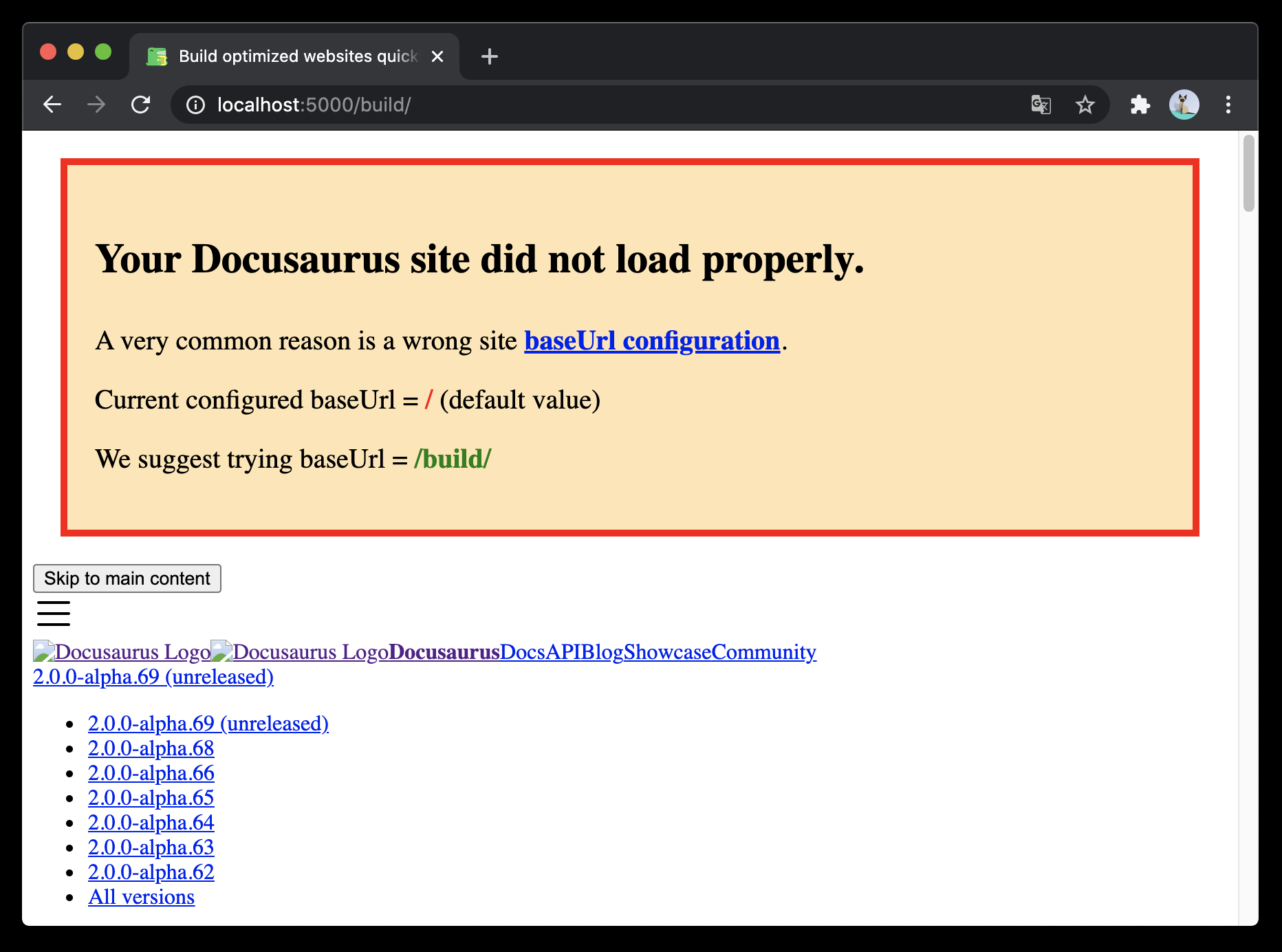
When enabled, will show a banner in case your site can't load its CSS or JavaScript files, which is a very common issue, often related to a wrong baseUrl in site config.
Example:
export default {
  baseUrlIssueBanner: true, // Defaults to `true`
};